








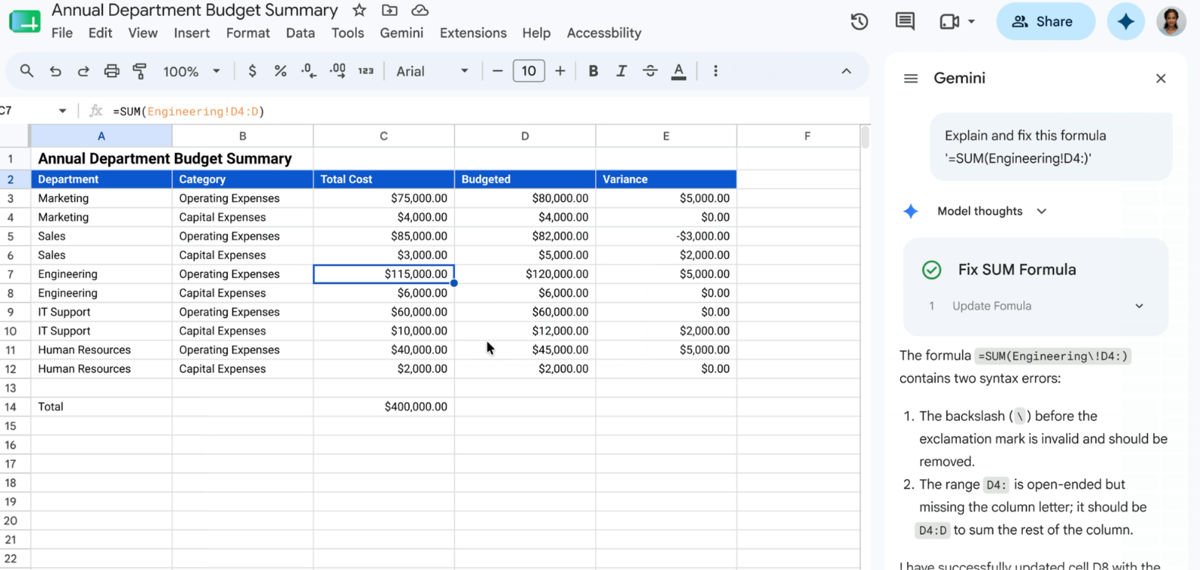
Anyone who’s used Google Sheets has hit that wall. You build a formula that looks right, then a #REF! or #VALUE! pops up with no explanation. The usual fix means squinting at the formula bar, then searching the error code. Maybe you ask a chatbot, but it can’t see your sheet either. Google just rolled out a Gemini Sheets formula fix that diagnoses and corrects errors in one click, right where they happen. According to Google’s Workspace blog, Gemini analyzes the surrounding data, then explains the issue in plain language alongside a corrected formula.
Why this matters beyond saving time
Sheets has always been somewhat intimdating for anyone new to spreadsheets. Some formulas, especially more complex ones, take real effort to learn. One stray comma turns a working formula into gibberish. That hurdle keeps plenty of people out of Sheets entirely and stick to manual entry instead.
This Gemini Sheets formula fixes that in a way generic AI chat never managed. The fix happens inside the same tab where the error showed up. There’s no copying a formula into a chat window and hoping the explanation matches your sheet. You click. The explanation shows up in plain English, and the formula corrects itself. That’s it.
Google says the fix is rolling out now through July 15. It’s available to Business Standard, Enterprise, and Google AI Pro and Ultra subscribers. Usage limits for the Gemini Sheets formula fix loosen during that window. The harder functions in Sheets were never about syntax. They were about feeling like you needed a manual for a tool everyone else picked up instantly. Gemini just deleted that feeling.